
Browse the docs
On this page
Dashboard reference
Open in dashboardSome work in the dashboard takes longer than a click: processing an uploaded document, generating FAQs or test cases, optimizing prompts, building a conversation map. That work runs as a background job, so you can leave the page and come back. The Jobs page lists every background job in your workspace with its status and progress.
Both Admins and Staff can view jobs.
Where to find it
Open More › Jobs in the left sidebar. This page is always available; it has no tab-visibility toggle.
The job list
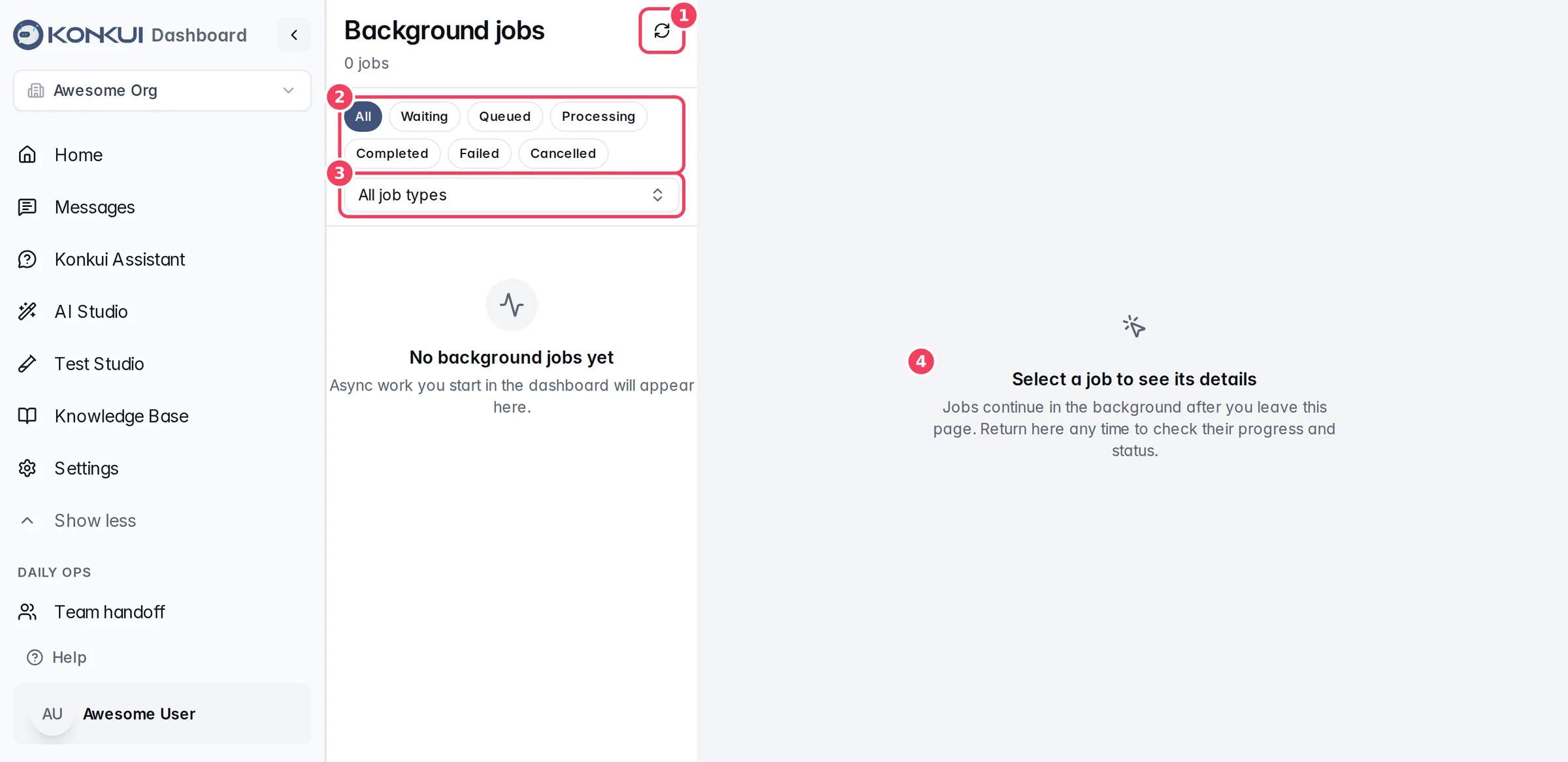
| # | Item | What it does |
|---|---|---|
| 1 | Refresh | Reloads the list. While jobs are running, a notice says how many, and the page refreshes automatically. |
| 2 | Status filters | Show All jobs, or only Waiting, Queued, Processing, Completed, Failed or Cancelled ones. |
| 3 | Job type | Show only one kind of job. Clear filters resets both filters. |
| 4 | Job details | Click a job in the list to see its details here. |
Each row shows the job type, its status, its current phase and progress, and when it was created. The title shows how many jobs match.
Job types
| Job type | Started from |
|---|---|
| Document processing | Uploading files to the Knowledge Base or Files |
| Product processing | Importing or updating products |
| FAQ generation | Generating FAQs with AI |
| Test case generation | AI Studio › Build from Conversations |
| Prompt optimization | AI Studio › Optimize |
| Conversation map, Semantic grouping | AI Studio › Conversation Map |
| Bot from website | Creating a bot from your website |
Job details
| Field | What it means |
|---|---|
| Status | The job's state with a short explanation. |
| Created / Started / Finished | When the job was queued, picked up and finished. |
| Retries | How many times the job was retried automatically. |
| Progress | A progress bar and the current phase, while the job is processing. |
| Queue time / Processing time | How long it waited and how long it ran. |
| Status | What it means |
|---|---|
| Waiting | The job is waiting briefly before it starts. |
| Queued | The job is waiting for a worker. |
| Processing | A worker is running the job. |
| Completed | The job finished successfully. |
| Failed | The job could not finish. Go back to the feature that started it to try again. |
| Cancelled | The job was cancelled before it finished. |
Cancel job appears when a job is still queued and has not started.